
Issue #011: NULL and Three-Valued Logic: The SQL Traps That Cost You Silently

A payments company ran a daily reconciliation query for eight months before anyone noticed it was wrong. The query aggregated transaction totals by region and compared them against bank statements. Every day it produced numbers. Every day the finance team signed off on them. Every day it was silently excluding transactions from three regions.
The bug was a single NULL in the
region_idcolumn of a lookup table — a row that had been inserted by a data migration script eighteen months earlier. The query usedNOT INwith a subquery. The NULL made the entireNOT INclause evaluate to UNKNOWN for every transaction. The finance team was reconciling against numbers that excluded roughly 4% of daily transaction volume.
Eight months of wrong numbers. One NULL. Zero errors. Zero warnings.
This is not a Postgres quirk or a MySQL gotcha. It is the mathematically correct behaviour of SQL’s three-valued logic — a system where comparisons involving NULL produce neither TRUE nor FALSE but a third value called UNKNOWN. Understanding why this happens, and where it happens, is the difference between writing queries that work and writing queries that look like they work.
Why NULL exists at all
CODD introduced NULL in his relational model to represent information that is missing or inapplicable. A customer with no phone number on file. An employee whose salary hasn’t been set yet. An order with no shipping date because it hasn’t shipped.
Two-valued logic — TRUE and FALSE — has no way to represent this. If you store 0 for a missing salary, you’ve confused “no salary” with “zero salary.” If you store an empty string for a missing email, you’ve confused “no email” with “an empty email address.” NULL is a different thing: it is the explicit representation of “we don’t know.”
CODD’s decision was correct and mathematically elegant. But it means SQL operates on three truth values, not two:
TRUE — the proposition is known to be true
FALSE — the proposition is known to be false
UNKNOWN — the proposition involves at least one NULL; we cannot determine its truth
Every WHERE clause filter, every JOIN condition, every CHECK constraint evaluates to one of these three values. Rows are included in results only when the predicate evaluates to TRUE. UNKNOWN rows are discarded — silently, identically to FALSE.
This is the mechanism behind the reconciliation bug. The NOT IN predicate evaluated to UNKNOWN for every row. UNKNOWN rows are discarded. Result: empty.
The five places NULL behaves differently
The challenge is that NULL’s semantics are not consistent across SQL contexts. The same value — NULL — is handled differently depending on where it appears.
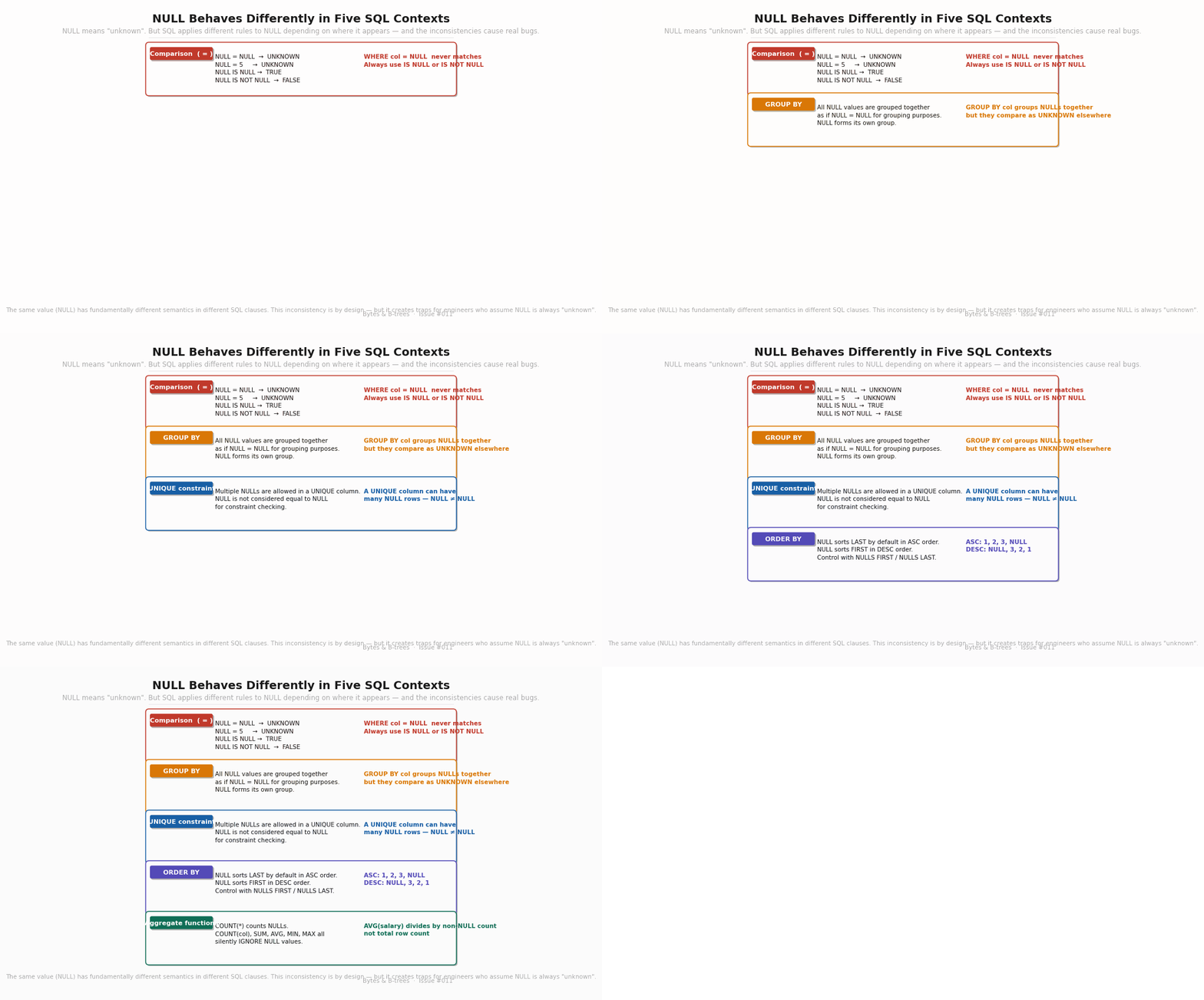
The diagram builds the five contexts in sequence, showing both the behaviour and the most common trap in each.
Comparisons ( = , != , > , < ): Any comparison involving NULL produces UNKNOWN. NULL = NULL is UNKNOWN, not TRUE. NULL = 5 is UNKNOWN. NULL != 5 is UNKNOWN. The only operators that handle NULL specially are IS NULL and IS NOT NULL — these are not comparisons, they’re existence tests, and they always return TRUE or FALSE.
-- This never matches any row, even rows where col IS NULL:
SELECT * FROM orders WHERE status = NULL;

-- This correctly finds NULL rows:
SELECT * FROM orders WHERE status IS NULL;
GROUP BY: NULL is grouped together. All rows with NULL in the GROUP BY column land in the same group, as if NULL equals NULL. This is the opposite of comparison behaviour, where NULL does not equal NULL. The inconsistency is intentional — grouping requires partitioning rows; without this rule, every NULL would be its own group.
SELECT region_id, COUNT(*) FROM orders GROUP BY region_id;
-- Rows with NULL region_id appear as a single group with region_id = NULL
UNIQUE constraints: Multiple NULLs are allowed in a UNIQUE column. The reasoning: since NULL does not equal NULL, two NULLs are not considered duplicates. A column with a UNIQUE constraint can contain many NULL rows. If you want to prevent this, add NOT NULL alongside UNIQUE.
ORDER BY: NULL sorts LAST in ascending order, FIRST in descending order by default. Control this explicitly with NULLS FIRST or NULLS LAST:
ORDER BY salary ASC NULLS LAST   -- 1, 2, 3, NULL
ORDER BY salary DESC NULLS LAST  -- 3, 2, 1, NULL
ORDER BY salary ASC NULLS FIRST  -- NULL, 1, 2, 3
Aggregate functions: Every aggregate function except COUNT(*) silently ignores NULL values. SUM, AVG, MIN, MAX, COUNT(column) — all of them exclude NULL rows from their computation without warning. COUNT(*) counts all rows including those with NULLs. COUNT(salary) counts only rows where salary is not NULL.
The AND and OR truth tables
Before the traps, the mechanics. Three-valued logic has precise rules for combining UNKNOWN with TRUE and FALSE:
ABA AND BA OR BTRUETRUETRUETRUETRUEFALSEFALSETRUETRUEUNKNOWNUNKNOWNTRUEFALSEUNKNOWNFALSEUNKNOWNUNKNOWNUNKNOWNUNKNOWNUNKNOWN
Two entries are surprising:
FALSE AND UNKNOWN = FALSE — regardless of what UNKNOWN resolves to, ANDing with FALSE gives FALSE. So the result is definitively FALSE.
TRUE OR UNKNOWN = TRUE — regardless of what UNKNOWN resolves to, ORing with TRUE gives TRUE.
These rules matter because SQL WHERE clauses are boolean expressions. A predicate like salary > 80000 AND department_id = 5 evaluates both sides and combines them with AND. If either side is UNKNOWN, the combined result follows the AND table above.
And NOT: NOT UNKNOWN = UNKNOWN. Negating an unknown truth is still unknown.
The trap every engineer hits: complementary predicates that don’t cover everything
Here is a query that looks like it returns all rows:
SELECT * FROM employees
WHERE salary > 50000 OR salary <= 50000;
It doesn’t. Employees with NULL salary satisfy neither predicate — both evaluate to UNKNOWN, UNKNOWN OR UNKNOWN = UNKNOWN, and UNKNOWN rows are excluded. An employee with no recorded salary is invisible to this query.
The correct version: WHERE salary > 50000 OR salary <= 50000 OR salary IS NULL.
This is why filtering on a nullable column requires explicit NULL handling. The complement of salary > 50000 is not salary <= 50000. It is salary <= 50000 OR salary IS NULL.
Try this now
Run this on any Postgres database. It demonstrates all four anomalous truth table entries in one query:
SELECT
    TRUE  AND UNKNOWN AS "T AND U",   -- UNKNOWN (surprising)
    FALSE AND UNKNOWN AS "F AND U",   -- FALSE   (surprising)
    TRUE  OR  UNKNOWN AS "T OR U",    -- TRUE    (surprising)
    FALSE OR  UNKNOWN AS "F OR U",    -- UNKNOWN (surprising)
    NOT UNKNOWN       AS "NOT U";     -- UNKNOWN
Postgres returns the values directly — no table needed. Notice the two entries that most engineers get wrong: FALSE AND UNKNOWN returns FALSE (not UNKNOWN), and TRUE OR UNKNOWN returns TRUE (not UNKNOWN).
The paid section covers the production traps that follow directly from these rules — including the reconciliation bug from the opening and exactly why NOT IN with a NULL subquery empties your result set.
What’s in this issue’s paid section
✦ The
NOT IN/ NULL trap — the full mechanism, the reconciliation bug explained, and the exact fix
✦ NULL in aggregate functions — the silent denominator problem withAVG,COUNT, andSUM
✦ The four NULL-safe operators:COALESCE,NULLIF,IS DISTINCT FROM,NULLS FIRST/LAST
✦GROUP BY NULLbehaviour and when it produces wrong business metrics
✦ Full hands-on experiments — 4 reproducible SQL demos with annotated output
✦ Production NULL audit checklist — 7 SQL queries to find NULL bugs in your existing schema
✦ Query Lab annotated solution from Issue #010
✦ Downloadable cheat sheet: NULL behaviour reference card$15/month · $120/year · cancel anytime
The NOT IN / NULL trap — the full mechanism
This is the bug that emptied eight months of reconciliation reports. Here it is in minimal form:
CREATE TEMP TABLE regions (id INT, region_id INT);
INSERT INTO regions VALUES (1, 10), (2, 20), (3, NULL);

CREATE TEMP TABLE transactions (id INT, region_id INT, amount NUMERIC);
INSERT INTO transactions VALUES (1, 10, 500), (2, 20, 300), (3, 30, 200);

-- Intended: find transactions in regions not marked active
SELECT * FROM transactions
WHERE region_id NOT IN (SELECT region_id FROM regions);
-- Returns: (0 rows)
The subquery returns {10, 20, NULL}. For each transaction row, SQL expands NOT IN as:
-- For transaction with region_id = 10:
10 NOT IN (10, 20, NULL)
= 10 != 10 AND 10 != 20 AND 10 != NULL
= FALSE AND TRUE AND UNKNOWN
= FALSE
-- Row excluded (correct — region 10 is in the list)

-- For transaction with region_id = 30:
30 NOT IN (10, 20, NULL)
= 30 != 10 AND 30 != 20 AND 30 != NULL
= TRUE AND TRUE AND UNKNOWN
= UNKNOWN
-- Row excluded (WRONG — should be included, region 30 is not in the list)
Every row where the match against NULL is the deciding factor becomes UNKNOWN and is excluded. The query returns nothing even when it should return rows.
Fix 1 — Filter NULL from subquery:
SELECT * FROM transactions
WHERE region_id NOT IN (
    SELECT region_id FROM regions WHERE region_id IS NOT NULL
);
-- Returns: (1 row) — transaction with region_id = 30
Fix 2 — Use NOT EXISTS (immune to NULL, often better plan):
SELECT t.* FROM transactions t
WHERE NOT EXISTS (
    SELECT 1 FROM regions r WHERE r.region_id = t.region_id
);
-- Returns: (1 row) — correct, and the planner uses an anti-join
NOT EXISTS works because it tests for the existence of matching rows, not equality. A NULL in the subquery cannot match any value from the outer query’s row.
Always prefer NOT EXISTS over NOT IN when the subquery touches nullable columns. It is safer, and the query planner often generates a more efficient plan (anti-join vs nested loop with filter).
NULL in aggregate functions — the silent denominator
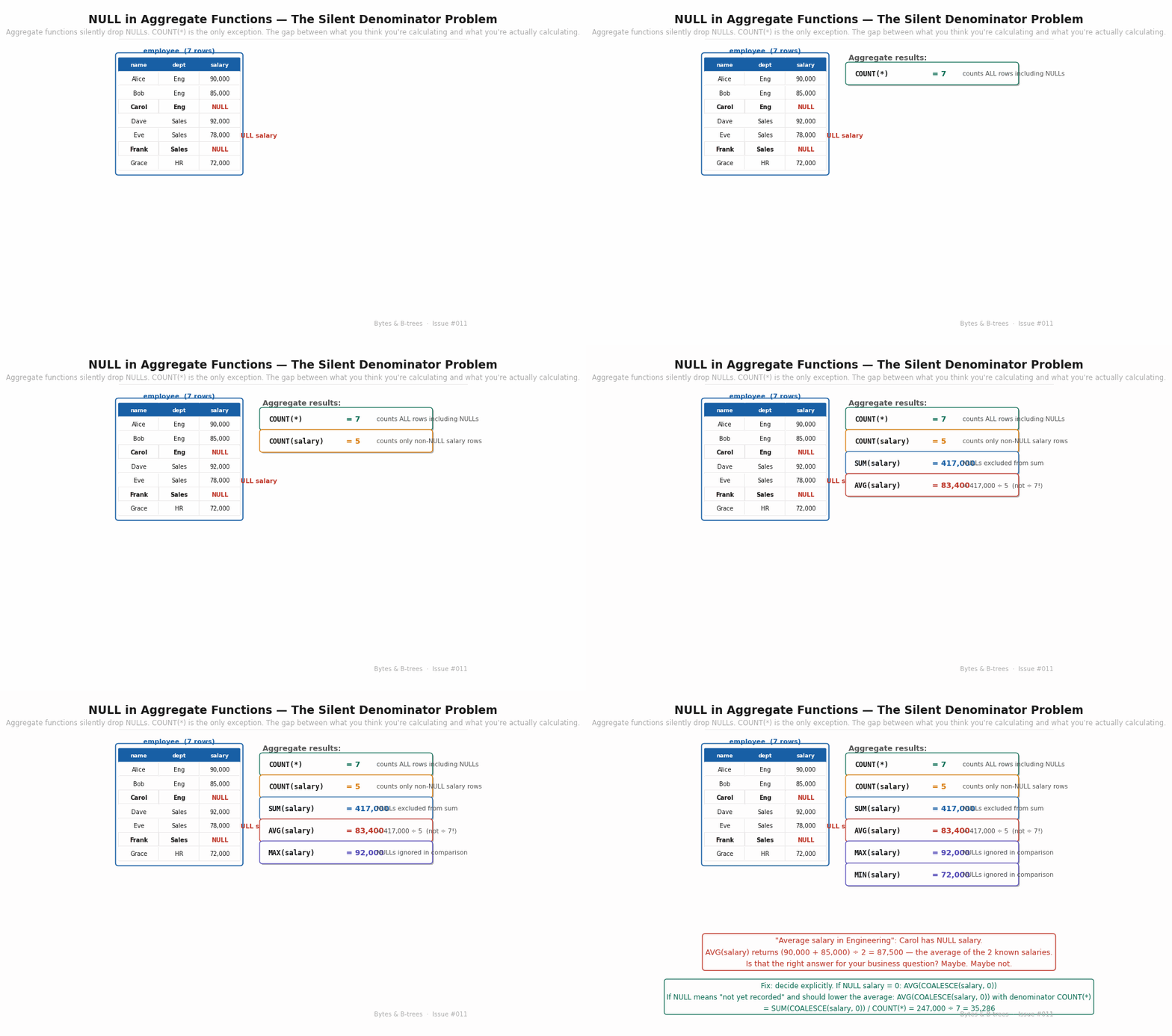
The diagram shows a 7-row employee table where 2 employees have NULL salary. It builds the aggregate results one by one — COUNT(*), COUNT(salary), SUM, AVG, MAX, MIN — showing which NULLs are included and which are silently excluded.
The dangerous one is AVG. Given salaries of {90k, 85k, NULL, 92k, 78k, NULL, 72k}:
COUNT(*)= 7 (counts all rows)COUNT(salary)= 5 (excludes 2 NULL rows)SUM(salary)= 417,000 (excludes NULLs)AVG(salary)= 417,000 ÷ 5 = 83,400 — not 417,000 ÷ 7 = 59,571
The AVG denominator is the count of non-NULL rows, not total rows. If you mean “average salary across all employees, treating unrecorded salaries as zero,” you must write:
-- Treating NULL salary as 0:
SELECT SUM(COALESCE(salary, 0)) / COUNT(*) AS true_avg FROM employees;
-- = 417,000 / 7 = 59,571

-- Or equivalently:
SELECT AVG(COALESCE(salary, 0)) FROM employees;
If you mean “average salary among employees with a recorded salary,” then AVG(salary) is correct — but document this intent explicitly in a comment, because the next engineer to read the query will assume it covers all rows.
The GROUP BY NULL problem:
SELECT region_id, SUM(amount) FROM orders GROUP BY region_id;Orders with NULL region_id form their own group, reported as:
region_id | sum
----------+------
       10 | 5000
       20 | 3200
     NULL | 1800   ← orders with no region assigned
If the business intent is “all orders belong to exactly one region,” this NULL group is data quality problem. If the intent is “some orders have no region,” this group is correct. The query cannot tell you which — you must know the business semantics.
Audit: SELECT COUNT(*) FROM orders WHERE region_id IS NULL — if this returns anything unexpected, you have unassigned orders silently accumulating in your aggregate totals.
The four NULL-safe operators
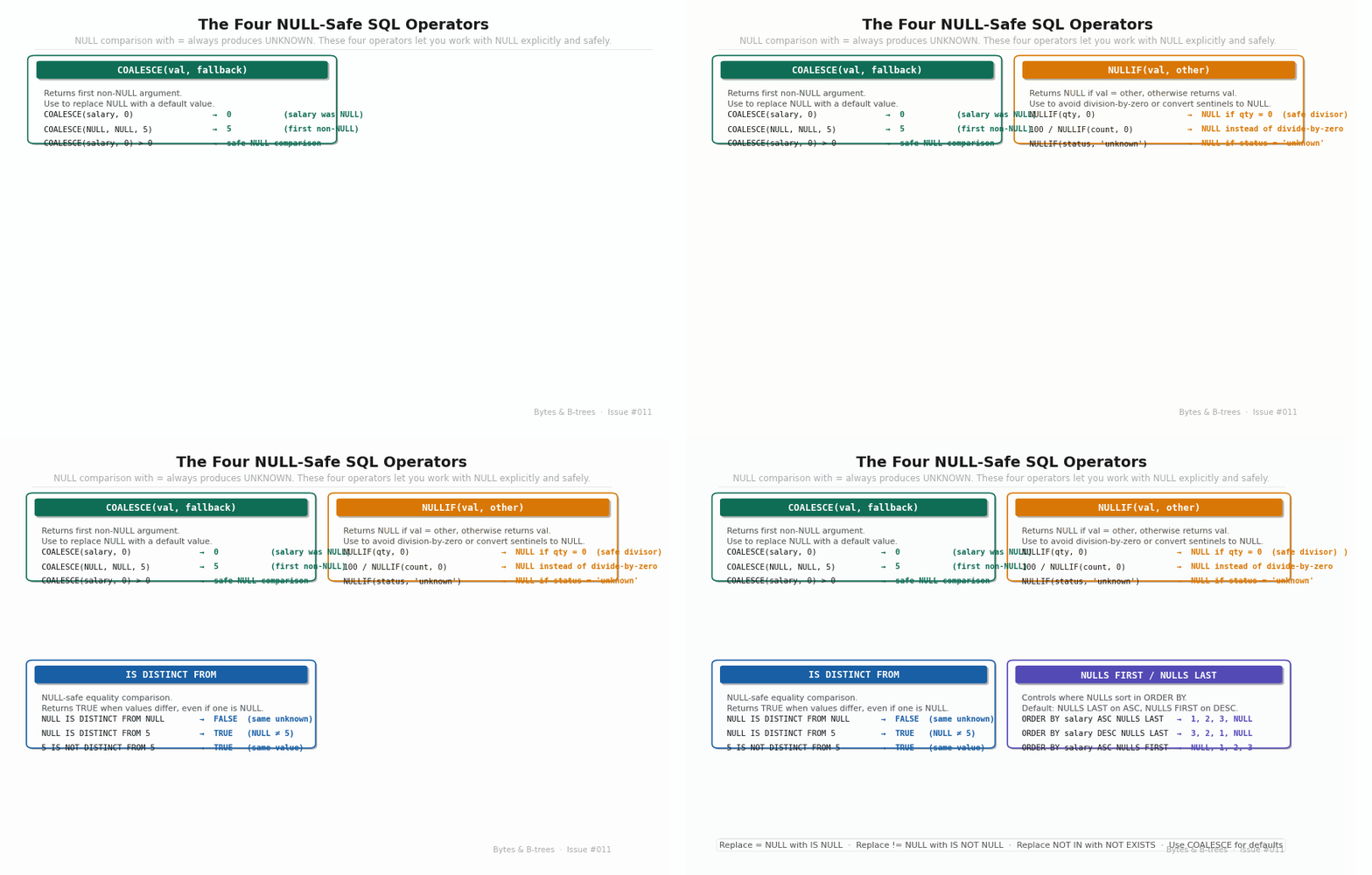
COALESCE(val, fallback, ...) — Returns the first non-NULL argument. The standard way to replace NULL with a default:
COALESCE(salary, 0)        -- 0 when salary is NULL
COALESCE(phone, email, 'no contact')  -- first non-NULL contact method
NULLIF(val, other) — Returns NULL if val = other, otherwise returns val. Prevents division-by-zero and converts sentinel values to NULL:
100 / NULLIF(divisor, 0)        -- NULL instead of division-by-zero error
NULLIF(status, 'unknown')       -- NULL when status = 'unknown'
IS DISTINCT FROM / IS NOT DISTINCT FROM — NULL-safe equality comparison. Unlike =, these return TRUE or FALSE even when NULL is involved:
NULL IS DISTINCT FROM NULL     -- FALSE  (same unknown = not distinct)
NULL IS DISTINCT FROM 5        -- TRUE   (NULL differs from 5)
5 IS NOT DISTINCT FROM 5       -- TRUE   (same value)
5 IS NOT DISTINCT FROM NULL    -- FALSE  (5 differs from unknown)
Use this when you need to compare two nullable columns and want NULL = NULL to be TRUE — the opposite of regular = behaviour.
NULLS FIRST / NULLS LAST — Explicit control over NULL sort position. Never rely on the default — it varies by sort direction. Always specify explicitly when NULLs appear in columns you sort by:
ORDER BY salary ASC  NULLS LAST   -- 72k, 78k, 85k, 90k, 92k, NULL, NULL
ORDER BY salary DESC NULLS LAST   -- 92k, 90k, 85k, 78k, 72k, NULL, NULL