
Data, storage & memory — first principles
Your database's durability guarantees are built on hardware that lies. Not metaphorically. Physically. Understanding exactly how is where everything else in this newsletter begins.

Here’s something that should bother you more than it probably does: when your database says “COMMIT successful,” it’s trusting a chain of hardware guarantees — and that hardware lies. RAM loses everything the moment power cuts. NAND flash, the storage inside every SSD, holds data by trapping electrons in a cage, and those electrons slowly leak. A cold SSD sitting unplugged in a warm room for a year can lose data silently, with no error, no warning, and no indication anything went wrong. Hard drives store bits as magnetic orientations on spinning metal platters. A strong enough nearby magnet flips them.
Databases don’t trust the hardware they sit on. The write-ahead log, the buffer pool, the fsync-before-commit sequence — all of it exists because engineers who built the first serious databases understood that hardware fails, stalls, and occasionally lies in ways that look exactly like success. You can’t understand why any of this machinery exists until you understand the physical constraints it’s working around. That’s the entire point of this first issue.
What a bit physically is — and why it matters more than you think
A bit on a hard disk drive is a microscopic region of magnetic material polarised in one of two orientations. The disk spins at 5,400 to 15,000 RPM while a read/write head floats just nanometers above the surface — close enough that a smoke particle or a human fingerprint would be catastrophic. To write, the head applies a magnetic field to flip the region’s orientation. To read, it detects the orientation of each region as it passes beneath. The whole thing is breathtakingly precise mechanical engineering, and a single head crash — where the head touches the platter — destroys the data beneath it permanently.
A bit on a NAND flash SSD is a floating-gate transistor: a microscopic switch that traps electrons in an insulated pocket to represent stored state. Writing requires forcing electrons through a thin oxide layer via quantum tunneling — a real quantum mechanical effect happening trillions of times per second inside your laptop. The problem is that this oxide layer degrades with each cycle. After roughly 3,000 write cycles on consumer-grade flash (100,000 on enterprise-grade MLC), the oxide can no longer reliably hold charge. This is why SSDs have a rated endurance in terabytes written, not years — the wear mechanism is physical and cumulative.
A bit in DRAM is a capacitor: a component that either holds an electrical charge or doesn’t. Capacitors leak. Without constant electrical refresh — the memory controller re-reads and re-writes every cell roughly every 64 milliseconds — the charge dissipates and data disappears. Cut power and this refresh cycle stops. Within milliseconds, everything in RAM is gone. Not corrupted. Gone.
None of this is abstract. Each physical constraint creates a design requirement that travels all the way up the stack:
DRAM’s volatility means a database cannot acknowledge a commit until something has reached persistent storage. Acknowledging first would mean data that “committed” can vanish in a power outage.
NAND’s write-cycle limit means both databases and SSDs try hard to minimise rewriting the same locations — write amplification is a real, measurable performance concern we’ll return to in issue #26.
HDD’s physical head movement means random reads require mechanical repositioning, costing 5–20ms each — a constraint that shapes every storage layout and indexing decision we’ll study over the next 40 issues.
The page: what databases actually read
When you ask Postgres to retrieve a single customer row, Postgres doesn’t retrieve that row. It retrieves the entire 8KB page that row lives on.
This isn’t sloppiness — it’s forced by hardware. The operating system reads files in chunks called blocks, typically 4KB on a Linux system. The overhead of initiating a disk read — the seek time on an HDD, the internal addressing on an NVMe, the system call through the kernel — is essentially identical whether you read 1 byte or 4,096 bytes. Given this, the OS always reads a full block: even if your query asked for one specific byte, bytes 0 through 4,095 come back together at no extra cost.
Postgres doubles this to 8KB per page, guaranteeing at least two OS blocks per database read. Every table and every index in Postgres is stored as a sequence of these 8KB pages. When Postgres loads a page into its in-memory buffer pool, every row on that page becomes instantly accessible — no additional I/O. Fetch one row from a page and you get all its neighbours for free.
The page is the atom of database storage. Rows are not independently readable from disk. They live inside pages, and pages are the unit of I/O, the unit of memory caching, and — as we’ll see in issue #36 — the unit of MVCC version management.
The page size is a real configuration choice with real trade-offs. Larger pages mean fewer I/O operations for sequential scans, which is good for analytical queries that read many rows. But for a query that needs one specific row, a larger page means more wasted bytes read from disk. Postgres’s 8KB default is a sensible middle ground for general-purpose workloads. ClickHouse, built for analytics, uses chunks an order of magnitude larger. We’ll revisit this when we get to storage layouts in issue #15.
Speed is relative — and the ratios are extreme
There’s a mental model every engineer should have before touching a database: the latency difference between memory and disk isn’t a percentage — it’s orders of magnitude. And that gap changes everything about how databases are built.
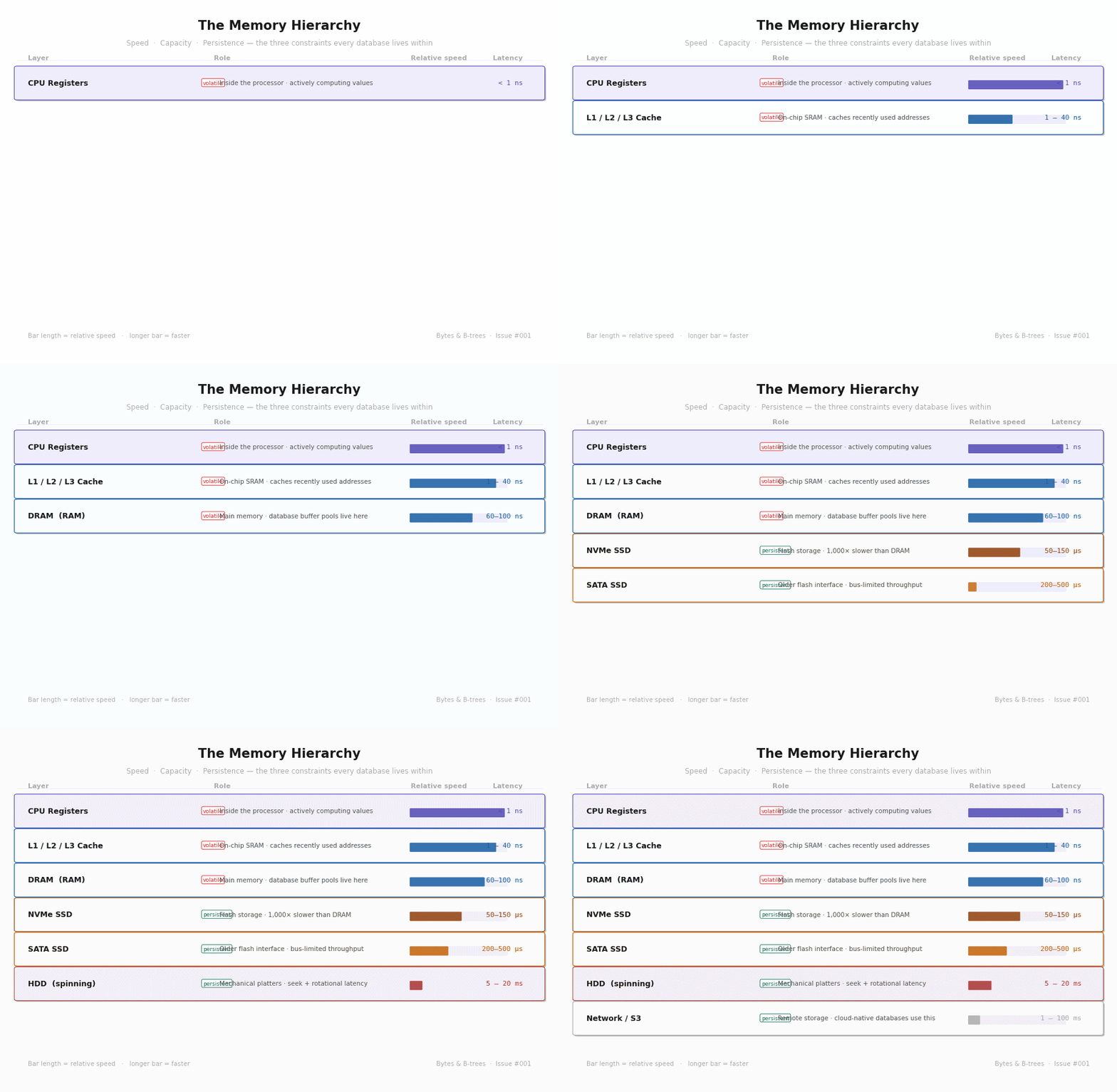
Read that diagram with the ratios in mind. DRAM is roughly 100,000 times faster than a spinning HDD for a random read. An NVMe SSD — which many engineers treat as “basically RAM” — is still 1,000 times slower than DRAM. These aren’t performance differences. They’re categorical differences that define the architecture of every database you’ll ever use.
The practical consequence: a database that fits entirely in RAM performs in a categorically different tier than one that has to touch disk for common reads. “Add RAM” is often the most impactful database performance recommendation not because it’s lazy advice, but because moving from disk reads to memory reads isn’t a speed-up — it’s eliminating a bottleneck that makes everything else irrelevant.
Sequential vs. random — the inequality that explains everything
Not all disk reads are created equal. Reading data that’s physically adjacent on disk — a sequential read — is fast. Jumping to an arbitrary location — a random read — is expensive. The difference is what makes databases architecturally interesting.
On a hard drive, a random read has two unavoidable mechanical costs before any data flows. First, the actuator arm swings to the right track on the platter — seek time, typically 5–15ms. Then the disk rotates until the correct sector passes under the read head — rotational latency, typically 2–8ms. Only then does data begin moving. That total of 7–23ms might seem small, but in the time a slow HDD random read takes, a modern CPU running at 3GHz has executed roughly 45 million instructions. An entire algorithm can run to completion during a single disk seek.
SSDs eliminated physical movement, but the asymmetry persists. An NVMe SSD delivers sequential reads at 7GB/s but random reads at perhaps 700MB/s — a 10x gap driven by internal flash management, garbage collection, and page addressing overhead. The hierarchy doesn’t disappear with faster hardware. It compresses.
This asymmetry is the single underlying reason why:
B-trees cluster related keys on adjacent pages, making range scans sequential
Write-ahead logs append sequentially to one file before touching scattered data pages
LSM trees batch many small random writes into large sorted sequential flushes
Every time one of these structures appears in a future issue, trace it back to this. Sequential I/O is 10x to 100,000x faster depending on your hardware. Database internals are largely a battle to convert random access patterns into sequential ones.
What “durable” actually means
When your application receives a successful COMMIT, it’s trusting a specific chain of hardware guarantees. Most engineers have a rough understanding of this chain. Very few know exactly where it can break.
Here’s the gap most engineers miss: when a program calls write() on a file, the data does not go to disk. It goes to the Linux kernel’s page cache — a pool of RAM managed by the OS, separate from your process’s memory. From your application’s perspective, the write succeeded. The kernel will flush this to disk later, on its own schedule, batching writes for throughput. If the machine loses power between your write() and the kernel’s eventual flush, your data is gone. No error. No warning. The OS confirmed success, and then the floor dropped.
Databases avoid this with fsync(). This system call blocks the calling process until the OS confirms that all previously-written data has physically reached the storage device’s non-volatile storage — actual platters or flash cells, not just OS page cache. It’s expensive: 10–30ms on an HDD, 500µs–5ms on an SSD. But it’s the only reliable guarantee that data survived.
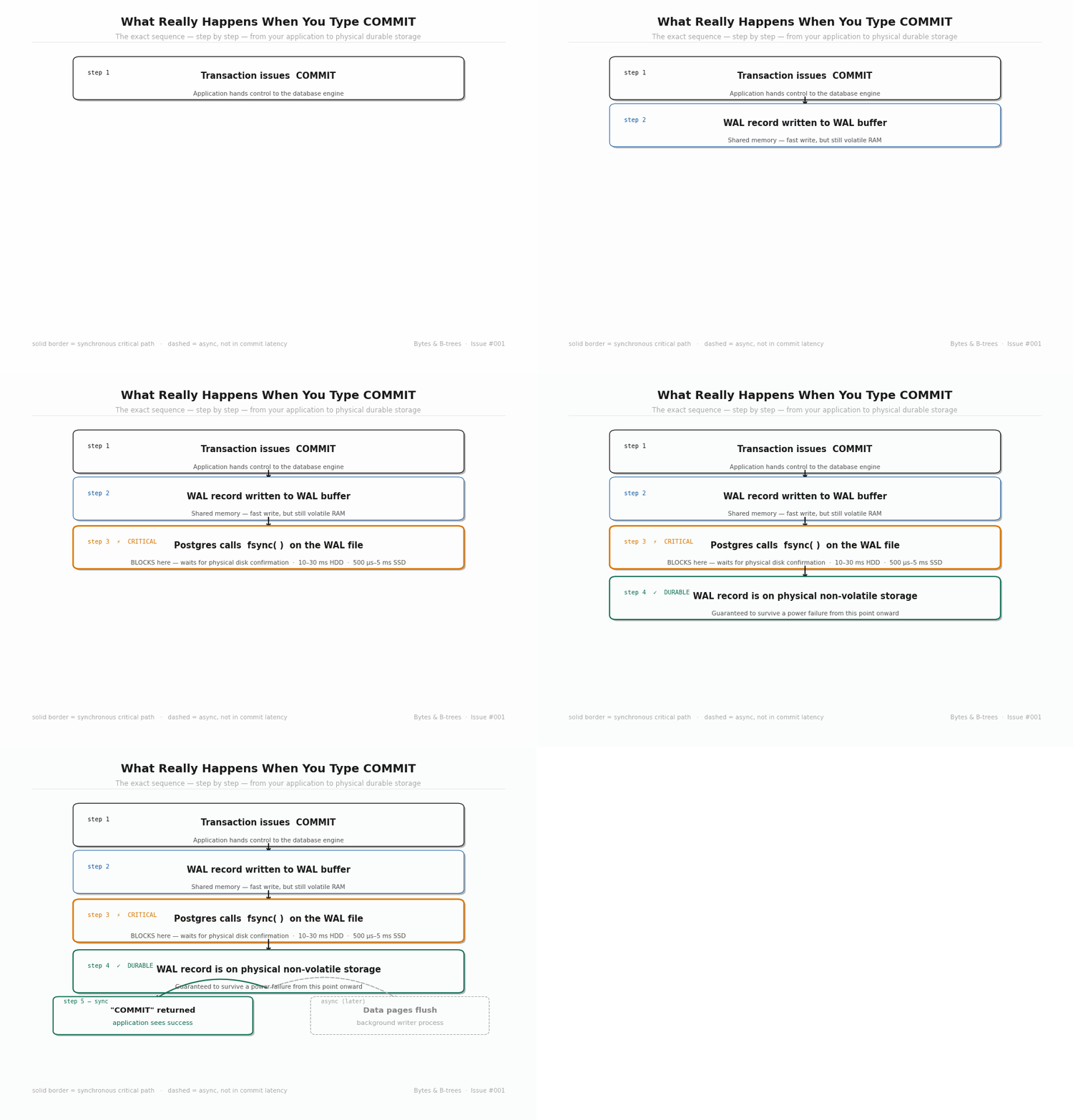
The diagram shows the insight: Postgres doesn’t fsync the full data file on every commit — that could be gigabytes. Instead it fsyncs a compact, sequential WAL record (typically a few hundred bytes), confirms durability, and only then returns “COMMIT” to your application. The actual table pages are written to disk later, asynchronously, by a background process called the background writer. If the machine crashes before that async step completes, Postgres replays the WAL on restart and reconstructs whatever was missing. The WAL is the source of truth. The data files are a derived cache of it.
This is why “WAL” appears in conversations about almost every database guarantee. It’s not a log in the sense of a debugging log. It’s the mechanism by which databases honour the durability contract without making every commit wait for a full data-file write.
The stack you’ll understand — issue by issue
Everything we’ve covered today sits at the bottom of a stack of abstractions. Each layer exists because the layer below it has a constraint that needs to be managed, hidden, or worked around. The buffer manager exists because disk is slow. The WAL exists because the buffer manager is volatile. The storage engine exists because raw pages have no structure. The query planner exists because the storage engine offers multiple ways to scan data and someone has to choose.
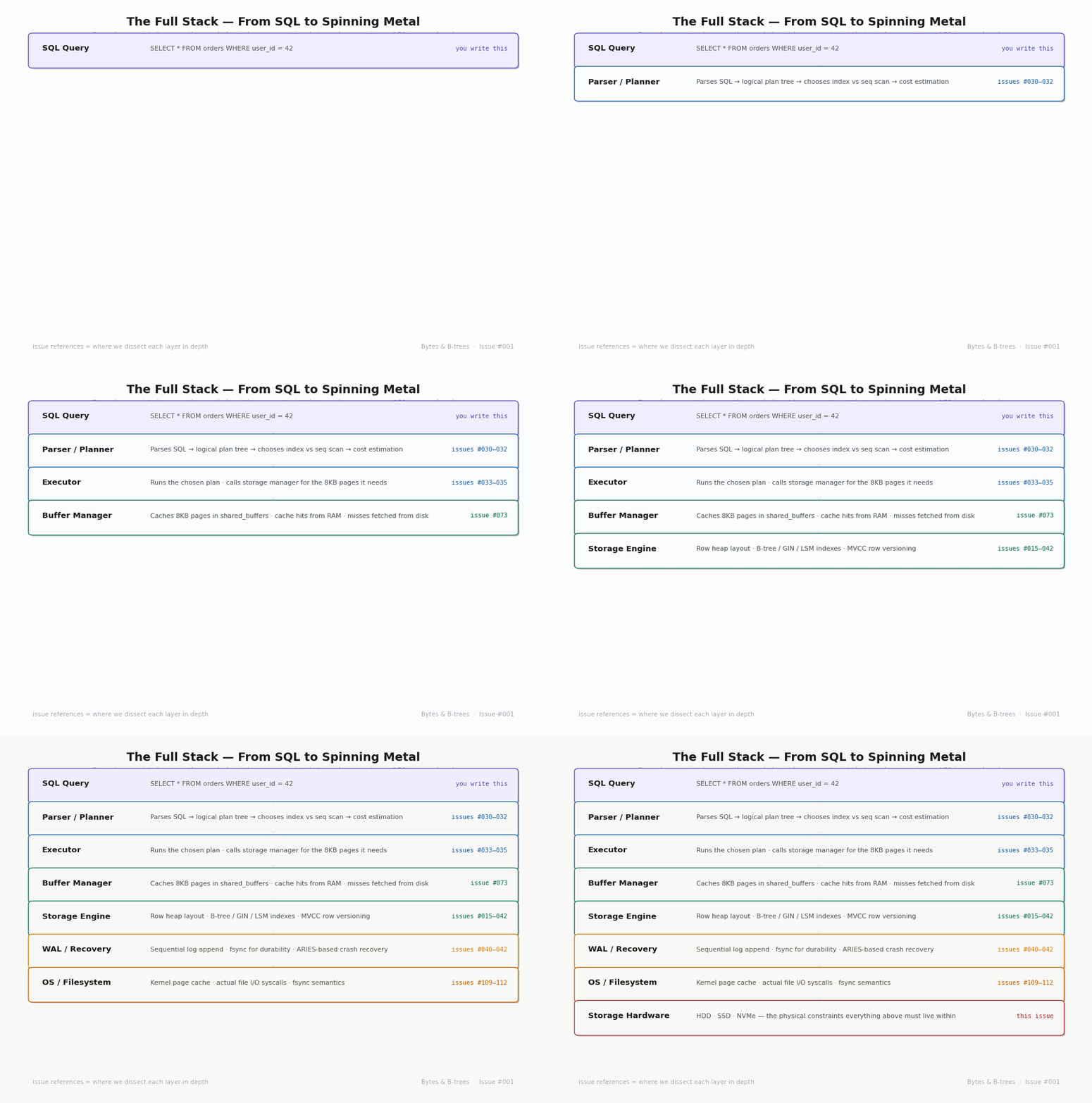
Over the next 171 issues, we’ll go deep into every layer of this stack — from the source code of Postgres’s buffer manager to the internals of RocksDB’s compaction algorithm, from Raft consensus to the mathematics of queuing theory applied to connection pool sizing. You won’t just know what these systems do. You’ll know why each design decision was made, what constraint it was responding to, and what it cost.
But it all starts here. With bits, bytes, pages, and the enormous speed gap between memory and disk that makes database engineering genuinely difficult. Every clever idea in every database system you’ll ever encounter is, at some level, a response to the constraints we covered today.
The practical takeaway
The takeaway from issue #1 is not a configuration change or a code snippet. It’s a mental habit:
Before reaching for any database explanation, ask what hardware constraint the design is working around.
The answer is almost always one of these three:
Memory is volatile — data in RAM disappears without power
Disk is slow — especially for random reads
Random access is far more expensive than sequential
Everything else follows.