
CODD's 12 rules — the complete definition of what "relational" actually means
In 1985, fifteen years after publishing the relational model, Edgar CODD watched vendors label their products "relational" while implementing the concept halfway

By the early 1980s, relational databases were commercially successful. Oracle was selling software. IBM had DB2. Ingres had a growing user base. SQL was on its way to standardisation. CODD’s 1970 paper had won.
And then the marketing departments got involved.
Software vendors who had built non-relational systems — or partially relational systems — began advertising them as “relational databases” because the term had acquired commercial cachet. A system that supported SQL queries but stored data in hierarchical structures. A system that had foreign keys but no support for joins. A system that was relational in spirit but navigational in implementation. The word “relational” was being diluted to the point of meaninglessness.
In 1985, CODD published a two-part article in Computerworld magazine under the headline “Is your DBMS really relational?” He laid out 12 rules — numbered 0 through 12 — that define what a system must do to legitimately call itself a relational database. The rules are not aspirational guidelines. They are a minimum specification. A system that violates any of them, CODD argued, is selling something that isn’t what it claims to be.
Reading the rules today is illuminating not because every database satisfies all of them — none do — but because the ones that get broken reveal exactly where the relational model turns out to be genuinely hard to implement, and what the industry decided to sacrifice.
Rule 0: The foundation rule
A system advertised as a relational database management system must manage data through its relational capabilities exclusively.
Rule 0 is the meta-rule. It says that if a system calls itself relational, it must use the relational model for everything — not just for some operations while using a different model for others. A system that supports SQL queries but also exposes record IDs as physical pointers, or that allows navigational access through proprietary APIs, fails Rule 0.
This rule was aimed directly at the hybrid systems of the early 1980s: products that had bolted SQL on top of existing hierarchical or network databases, offering relational queries as a layer while the underlying data management remained navigational. If you could get better performance by bypassing the SQL layer and using the underlying navigational interface directly — and many of these systems let you do exactly that — you didn’t have a relational database. You had a navigational database with a SQL interface.
Why it matters today: Some NoSQL databases offer SQL-like query languages as a thin layer over non-relational data models. Apache Cassandra’s CQL looks like SQL but doesn’t support joins or transactions in the relational sense. Using these systems’ SQL syntax doesn’t give you the guarantees of the relational model. Rule 0 says: the model is what matters, not the syntax.
Rules 1 and 2: Information and guaranteed access
Rule 1 — All information in a relational database is represented at the logical level in exactly one and only one way: as values in tables.
Rule 2 — Each and every datum (atomic value) in a relational database is guaranteed to be logically accessible by resorting to a combination of table name, primary key value, and column name.
These two rules together establish the fundamental data representation contract. All data is in tables. All data is accessible by known logical names. There are no hidden identifiers, no physical row pointers visible to the user, no secondary representations that the programmer must know about.
Where this gets interesting with ORMs: Object-relational mapping libraries often expose internal identifiers — auto-increment integers, UUIDs — as primary keys that are visible to application code. This is fine and consistent with Rules 1 and 2. The problem arises when the ORM begins relying on implementation details: assuming that row IDs are sequential, or using physical offsets, or bypassing the SQL layer for “performance.” When an ORM’s behaviour depends on the physical storage layout rather than the logical schema, it’s violating the spirit of Rule 1.
The ctid issue in PostgreSQL: Postgres has a system column called ctid — the physical location of a row on disk, expressed as (page_number, tuple_offset). You can query it with SELECT ctid, * FROM table. This is a violation of Rule 1’s spirit — it exposes physical storage information as a queryable value. Postgres doesn’t advertise ctid as a user-facing feature for exactly this reason. It exists for internal use and should never appear in application code.
Rule 3: Systematic NULL treatment
Null values (distinct from the empty character string or a string of blank characters and distinct from zero or any other number) are supported in fully relational DBMS for representing missing information and inapplicable information in a systematic way, independent of data type.
This rule acknowledges something genuinely uncomfortable: sometimes information is unknown or inapplicable, and the database must represent this in a consistent, type-independent way. NULL is not zero. NULL is not an empty string. NULL is the absence of a known value, and it must propagate correctly through all operations.
Why NULL is so strange — and why CODD’s rule is mathematically correct: NULL introduces three-valued logic into SQL. A comparison like salary > 50000 can evaluate to TRUE, FALSE, or UNKNOWN — unknown when salary is NULL. This propagates through boolean expressions: TRUE AND UNKNOWN = UNKNOWN, FALSE AND UNKNOWN = FALSE, TRUE OR UNKNOWN = TRUE.
This is internally consistent but deeply counterintuitive. Consider:
sql
SELECT * FROM employees WHERE salary > 50000 OR salary <= 50000;This looks like it should return all rows — every salary is either above or below 50,000. But employees with NULL salary are returned by neither condition, because both comparisons evaluate to UNKNOWN. The query misses them.
Or consider the NOT IN trap:
sql
SELECT name FROM employees
WHERE dept_id NOT IN (SELECT dept_id FROM departments WHERE budget > 1000000);
If any row in the subquery returns NULL for dept_id, the entire NOT IN clause evaluates to UNKNOWN for every employee, and the query returns zero rows — silently. This is a genuine bug that has affected real production systems.
Postgres handles this correctly, mostly: Postgres implements three-valued logic faithfully and provides IS NULL, IS NOT NULL, IS DISTINCT FROM, and NULLIF to handle NULL explicitly. The behaviour is correct by CODD’s specification, even when it surprises developers.
Rule 4: Active online catalog
The database description is represented at the logical level in the same way as ordinary data, so that authorised users can apply the same relational language to its interrogation as they apply to the regular data.
The database schema — the table definitions, column types, constraints, indexes, views — is itself stored as data in tables and queryable with the same SQL used to query regular data. There’s no separate metadata API; there’s no special administrative interface required to understand the schema. The schema is just more tables.
In Postgres: The information_schema views and pg_catalog system tables implement Rule 4. You can query the schema exactly as you query your data:
sql
-- What tables exist in my database?
SELECT table_name FROM information_schema.tables
WHERE table_schema = 'public';

-- What columns does the orders table have?
SELECT column_name, data_type, is_nullable
FROM information_schema.columns
WHERE table_name = 'orders';

-- What indexes exist on a table?
SELECT indexname, indexdef
FROM pg_indexes
WHERE tablename = 'orders';
This is elegant and powerful. It means introspection tools, schema migration frameworks, and database administration interfaces can all be built using standard SQL rather than proprietary metadata APIs. ORM frameworks use exactly this capability to understand your database schema at runtime without you having to tell them what tables exist.
Rule 5: Comprehensive data sublanguage
A relational system may support several languages and various modes of terminal use. However, there must be at least one language whose statements are expressible, per some well-defined syntax, as character strings and that is comprehensive in supporting all of the following: data definition, view definition, data manipulation (interactive and by program), integrity constraints, authorization, and transaction boundaries.
SQL satisfies Rule 5. A single language handles CREATE TABLE, CREATE VIEW, SELECT, INSERT, UPDATE, DELETE, CHECK constraints, GRANT/REVOKE, BEGIN/COMMIT/ROLLBACK. You don’t need separate tools for schema management, data manipulation, and transaction control.
Where vendors broke this in the 1980s: Early database products often had separate languages for DML (data manipulation) and DDL (data definition), or required transactions to be managed through an external library rather than within the query language itself. Separating these concerns was a Rule 5 violation — it meant you couldn’t express a complete database operation in a single language.
Rule 6: View updating
All views that are theoretically updatable must be updatable by the system.
This is the rule most databases break most visibly, and it’s worth spending real time on.
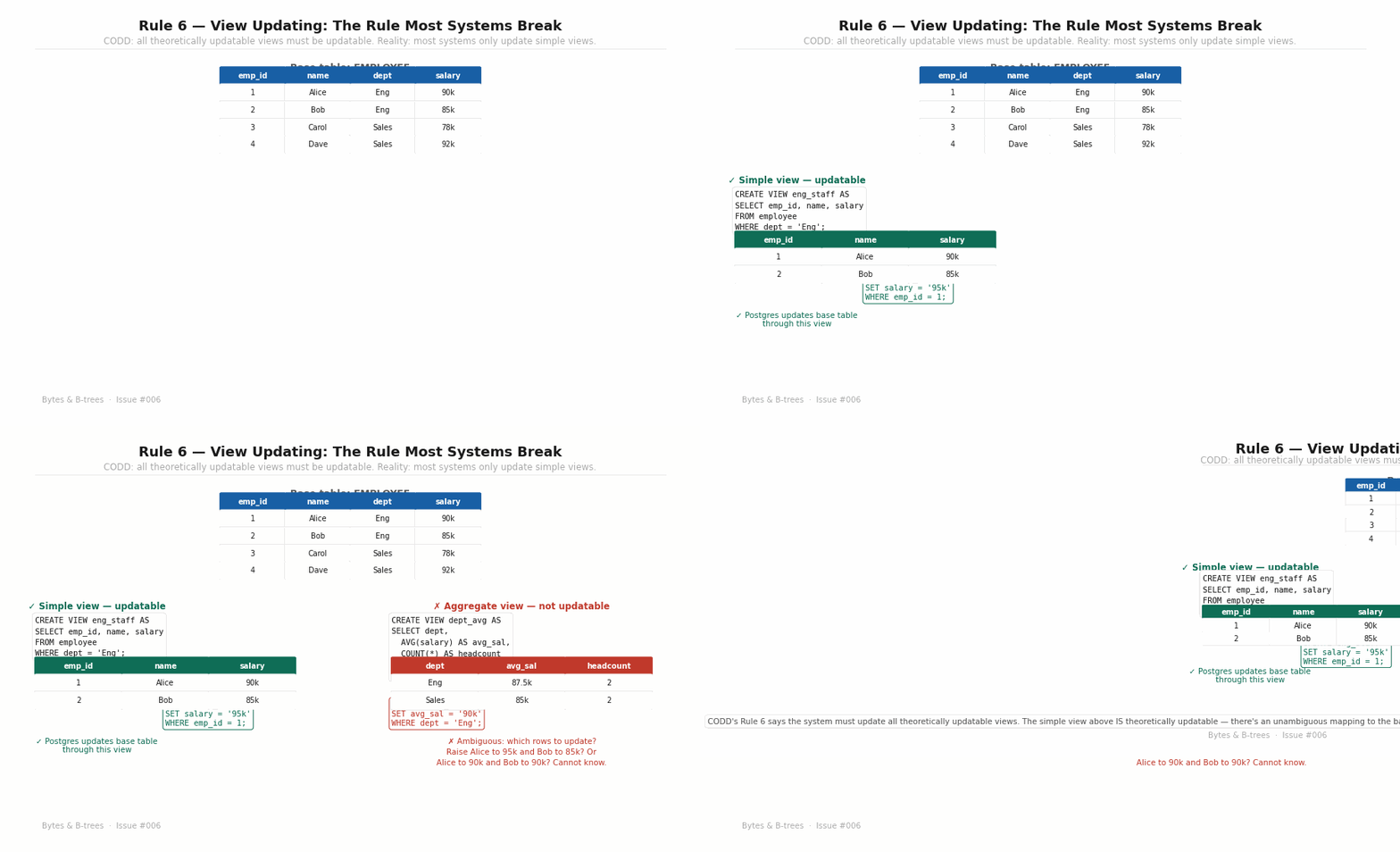
A view is a saved query — a named SELECT that you can treat as a table. The question Rule 6 asks is: if a view is a simple, unambiguous projection of a base table, should you be able to UPDATE through it?
CODD says yes — the database must determine which views are theoretically updatable and honour that.
What “theoretically updatable” means: A view is theoretically updatable if there is an unambiguous mapping between every row in the view and exactly one row in an underlying base table, and if every update to the view translates unambiguously into an update to the base table.
A view that selects a subset of rows and columns from a single table is theoretically updatable — every view row maps to exactly one base table row, and updating the view means updating that row.
sql
-- Theoretically updatable: simple projection
CREATE VIEW eng_staff AS
SELECT emp_id, name, salary FROM employee WHERE dept = 'Engineering';

-- This SHOULD work, and in Postgres it does:
UPDATE eng_staff SET salary = 95000 WHERE emp_id = 1;
A view that joins multiple tables, aggregates rows, or uses window functions is theoretically non-updatable — there’s no unambiguous base table row to modify.
sql
-- Not updatable: aggregate across rows
CREATE VIEW dept_stats AS
SELECT dept, AVG(salary) as avg_sal, COUNT(*) as headcount
FROM employee GROUP BY dept;

-- What would this mean? Which rows to change?
UPDATE dept_stats SET avg_sal = 90000 WHERE dept = 'Engineering';
-- ERROR in all databases — correctly rejected
Where modern databases partially break Rule 6: Postgres supports updating simple views automatically. But it doesn’t automatically support updating views that join two tables, even when the update is theoretically unambiguous (changing a column that maps clearly to one of the joined tables). You must create explicit INSTEAD OF triggers to enable this. MySQL has similar limitations. CODD would say this is a partial violation: the system could determine theoretical updatability for join views in many cases, but chooses not to.
Rule 7: High-level insert, update, and delete
The capability of handling a base relation or a derived relation as a single operand applies not only to the retrieval of data but also to the insertion, update, and deletion of data.
SQL satisfies this: UPDATE orders SET status = 'shipped' WHERE order_date < '2024-01-01' updates an entire set of rows in one statement, not one row at a time. This is a fundamental departure from navigational databases where you position a cursor on a single record and modify it.
Set-based operations are not just syntactic convenience — they enable the query optimiser to choose the most efficient execution strategy. A set-based UPDATE on indexed data can use the index; a row-by-row cursor update must access every row individually.
The RBAR anti-pattern: RBAR (Row By Agonizing Row) is the name given to the common mistake of writing SQL that processes one row at a time — typically via a cursor in a stored procedure — when a set-based operation would be more efficient. It’s a violation of Rule 7’s spirit: you’re bypassing the relational engine’s set-processing capabilities to implement navigational logic in SQL.
sql
-- RBAR: processing one row at a time
DECLARE cur CURSOR FOR SELECT id FROM orders WHERE status = 'pending';
OPEN cur;
FETCH NEXT FROM cur INTO @id;
WHILE @@FETCH_STATUS = 0 BEGIN
    UPDATE orders SET status = 'processing' WHERE id = @id;
    FETCH NEXT FROM cur INTO @id;
END;

-- Rule 7: set-based, as CODD intended
UPDATE orders SET status = 'processing' WHERE status = 'pending';
The second version can leverage indexes, run in parallel, and be optimised by the query planner. The first version cannot.
Rules 8 and 9: Physical and logical data independence
Rule 8 — Application programs and terminal activities remain logically unimpaired whenever any changes are made to either storage representations or access methods.
Rule 9 — Application programs and terminal activities remain logically unimpaired when information-preserving changes of any kind that theoretically permit unimpairment are made to the base tables.
These are the two data independence rules from CODD’s 1970 paper, now formalised.
Rule 8 (physical independence) is generally well-honoured: you can add indexes, change storage parameters, partition tables, move data between tablespaces, and application SQL stays unchanged. This is the rule that lets DBAs tune performance without requiring application code changes.
Rule 9 (logical independence) is where things get interesting — and where most databases only partially comply. Adding a new column to a table (an information-preserving change) should not break existing queries. In Postgres and MySQL, it doesn’t — queries that select specific columns continue to work. But queries that use SELECT * will now return the new column, which may surprise applications that expected a fixed column count.
The harder cases: Splitting one table into two (decomposing a wide table with mixed concerns) or merging two tables are information-preserving changes — the data hasn’t changed, just its organisation. Rule 9 says these changes shouldn’t require application modifications. In practice, they usually do — applications that named the original table must be updated to use the new table names or a compatibility view.
True Rule 9 compliance would mean the database automatically maintains compatibility views that preserve the old interface after structural reorganisation. No major database does this automatically.
Rules 10, 11, and 12: Integrity, distribution, and non-subversion
Rule 10 — Integrity constraints specific to a particular relational database must be definable in the relational data sublanguage and storable in the catalog, not in the application programs.
Constraints belong in the database, not in the application. CHECK (price > 0), FOREIGN KEY (customer_id) REFERENCES customers(id), UNIQUE (email) — these are Rule 10. When constraints live in application code, a different application that bypasses the ORM (a data migration script, an admin tool, a reporting query) can violate them silently.
Rule 11 — A relational DBMS has distribution independence.
A database should appear identical whether it is a single-server system or a distributed system. Queries written for a non-distributed database should work unchanged on a distributed one. This is the hardest rule to fully satisfy — distributed systems introduce consistency trade-offs (CAP theorem, which we’ll cover in issue #059) that make true location transparency impossible without performance costs. Every distributed database makes some compromise here.
Rule 12 — If a relational system has a low-level (single-record-at-a-time) language, that low-level language cannot be used to subvert or bypass the integrity rules and constraints expressed in the higher-level relational language.
Stored procedures, triggers, and embedded SQL must respect the constraints defined at the relational level. You cannot write a stored procedure that sets a foreign key to an invalid value by operating on raw storage structures. The relational constraints are non-negotiable, regardless of the interface used to access the data.
Where MySQL historically broke Rule 12: For many years, MySQL’s MyISAM storage engine did not enforce foreign key constraints — even when they were defined in the schema. Application code could insert orphaned records (orders without valid customer IDs) through the normal SQL interface, and the engine would silently accept them. InnoDB enforced foreign keys correctly; MyISAM did not. This was a clear Rule 12 violation — the constraint was defined in the relational schema but not enforced.
The compliance scorecard
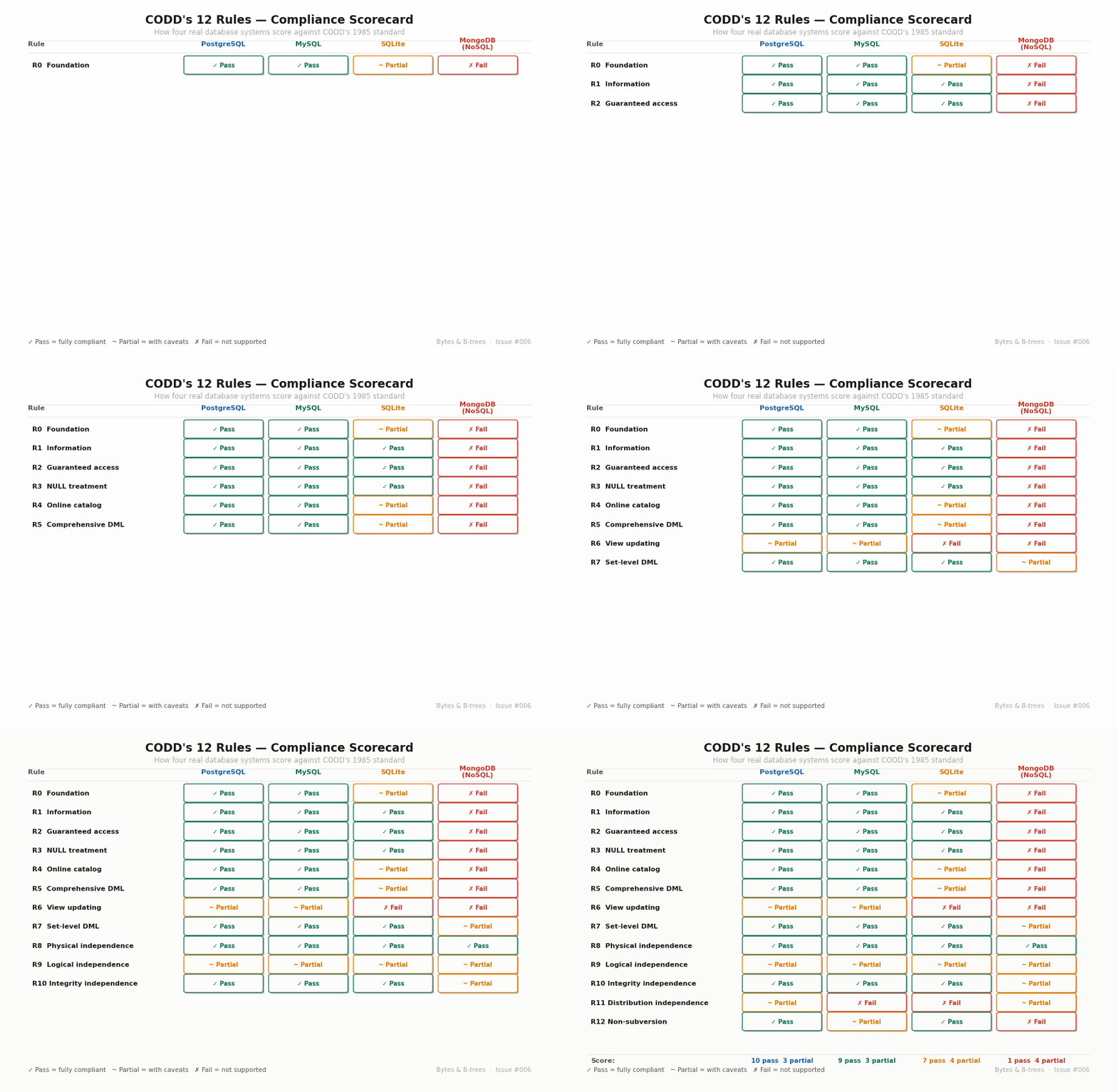
The scorecard shows how four systems — PostgreSQL, MySQL, SQLite, and MongoDB (as a NoSQL comparison point) — score against all 13 rules. The results are instructive:
PostgreSQL is the most compliant major database, passing most rules and partially complying with the genuinely difficult ones (Rule 6 view updating, Rule 9 logical independence, Rule 11 distribution independence for single-node deployments).
MySQL has historically been more permissive — silent truncation of out-of-range values, optional foreign key enforcement, non-standard NULL handling in some edge cases. Modern MySQL (8.x) is significantly more correct than older versions, but its compliance history is checkered.
SQLite is intentionally a single-user embedded database, not a server. It makes explicit compromises: loose typing (”type affinity” rather than strict types), no stored procedures, limited view updating. It’s not trying to be a fully relational system in the way Postgres is — it’s optimising for embeddability.
MongoDB fails nearly every rule — not because it’s poorly built, but because it is deliberately not a relational database. It has a different model with different trade-offs. Measuring it against CODD’s rules is useful precisely to show what you give up when you leave the relational model.
Why these rules still matter
CODD wrote these rules in 1985 to protect a word — “relational” — from being diluted. Forty years later, the relevant question isn’t really “does your database pass CODD’s rules?” The relevant question is: for each rule your database violates, do you know what you’re giving up?
A database that partially violates Rule 9 (logical independence) means that some schema changes will require application code changes — you should plan for that. A database that violates Rule 11 (distribution independence) means that moving from a single-server to a distributed setup will require query modifications — you should know that before committing to a distributed architecture. A database that violates Rule 12 means that bypassing the ORM with raw SQL can silently corrupt your data — you should enforce discipline around who can write migration scripts.
The rules are not a test to pass. They’re a map of where the relational model’s guarantees end and your application’s responsibilities begin.